WORKED EXAMPLE · STUDYING ASSOCIATION
Pearson Correlation Worked Example: Two Numeric Variables
Follow twenty synthetic participant pairs from a scatterplot and design checks through Pearson’s correlation coefficient, its confidence interval, interpretation, and reporting.
Published by BioTabularLast reviewed: October 27, 2026
This worked example uses synthetic data created for teaching. Suppose researchers measure one biomarker and one continuous physiological response once in each of twenty independent participants. The question is whether larger biomarker values tend to accompany larger response values in a linear pattern.
Define the paired structure and target
- Observational unit
- The participant; each participant contributes one row.
- Pairing structure
- Biomarker and response values on the same row come from the same participant.
- Variables
- Biomarker concentration in ng/mL and physiological response in study units.
- Target
- The direction and strength of the population linear association.
- Primary display
- A scatterplot of the complete participant-level pairs.
- Starting method
- Two-sided Pearson correlation because a linear summary is scientifically meaningful and the observed pattern supports it.
The rows are paired across variables but independent across participants. This is not the same use of “paired” as a paired t-test: correlation analyzes how two variables co-vary, not the mean of within-person differences.
Inspect the synthetic data
| Participant | Biomarker (ng/mL) | Physiological response (units) |
|---|---|---|
| P01 | 10 | 32 |
| P02 | 11 | 45 |
| P03 | 12 | 35 |
| P04 | 13 | 52 |
| P05 | 14 | 41 |
| P06 | 15 | 49 |
| P07 | 16 | 56 |
| P08 | 17 | 44 |
| P09 | 18 | 62 |
| P10 | 19 | 50 |
| P11 | 20 | 68 |
| P12 | 21 | 61 |
| P13 | 22 | 55 |
| P14 | 23 | 73 |
| P15 | 24 | 65 |
| P16 | 25 | 79 |
| P17 | 26 | 70 |
| P18 | 27 | 83 |
| P19 | 28 | 76 |
| P20 | 29 | 88 |
Look at the scatterplot first
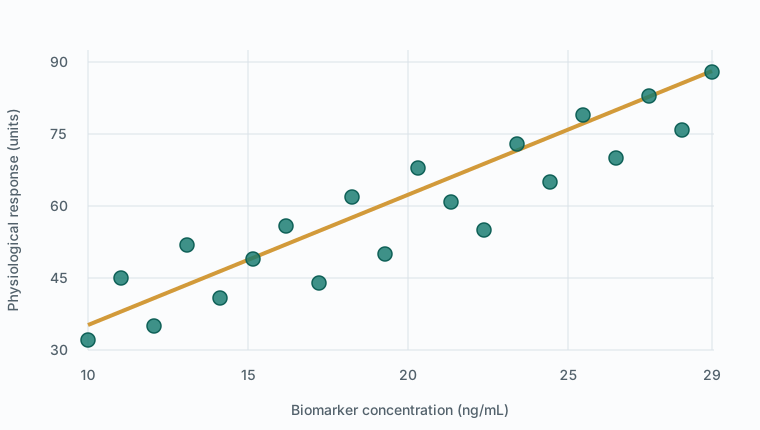
The plot does not show an obvious curve, separated clusters, or one isolated observation controlling the direction. The values cover the studied biomarker range, and every participant contributes exactly one complete pair. These features make Pearson correlation a reasonable summary for this teaching dataset.
Had the pattern risen consistently but curved strongly, a Spearman rank correlation might better match a monotonic question. A U-shaped pattern would not be summarized adequately by either coefficient alone.
Calculate Pearson’s correlation
Pearson’s coefficient standardizes the cross-product of deviations from the two sample means. It ranges from −1 to +1. The sign gives direction, while the absolute magnitude describes how tightly the points follow a straight-line pattern.
- Complete pairs
- 20; omitted 0
- Mean biomarker
- 19.5 ng/mL
- Mean response
- 59.2 units
- Pearson correlation
- r = 0.916966
- Test statistic
- t(18) = 9.7511
- 95% confidence interval
- 0.7984 to 0.9671
t = r × √[(n − 2) ÷ (1 − r²)]r = .917; t(18) = 9.751; p < .001
BioTabular’s two-sided confidence interval uses Fisher’s z transformation. The interval excludes zero and remains within a strongly positive range. Squaring the sample coefficient gives r² = .841, a descriptive measure of shared linear variation in this sample. It should not be described as the percentage of one variable caused by the other.
Assumptions and practical checks
- Independent rows: each participant contributes one pair. Repeated measurements from the same participant require a dependence-aware method.
- Meaningful numeric variables: both measures support a linear association summary over the observed range.
- Approximately linear form: inspect the scatterplot; a coefficient cannot reveal curvature on its own.
- No dominating observation: investigate unusual points rather than deleting them mechanically. Report sensitivity analyses when scientifically justified.
- Appropriate inference: the usual test and Fisher-transformed interval concern a population correlation under standard sampling assumptions.
Separate normality tests on the biomarker and response do not decide between Pearson and Spearman. The relationship’s form, measurement scales, scientific target, independence, and influence of unusual observations matter more directly.
Reproduce the result in BioTabular
- Download the synthetic CSV and open the correlation calculator.
- Import the file. Keep
Participant_IDas the identifier and both measurement columns as numeric. - Confirm the variable roles. Select Pearson correlation, then choose
Biomarker_ng_mLas the first variable andPhysiological_Response_unitsas the second. - Keep the two-sided alternative and α = .05, then run the analysis.
- Confirm 20 complete pairs, r = .917, t(18) = 9.751, p < .001, and a 95% CI from .798 to .967 after display rounding.
- Send the scatterplot to Plot Studio and, if useful, add the Pearson fitted line. Preserve visible points so readers can evaluate the pattern.
Interpret the result
The sample provides strong evidence of a positive linear association over the observed ranges: participants with higher biomarker concentrations tend to have higher physiological responses. The confidence interval describes plausible values for the population linear correlation under the model and sampling assumptions.
This does not show that changing the biomarker would change the response. A third variable could influence both; selection, measurement processes, or study design could also explain part of the association. Correlation is symmetric—swapping the axes leaves r unchanged—and it does not estimate a directional causal effect.
Reporting example
“Among 20 participants with complete measurements, biomarker concentration and physiological response showed a strong positive linear association (Pearson r = .917, 95% CI .798 to .967, p < .001). The scatterplot showed an approximately linear pattern without an isolated observation dominating the association. This observational association does not establish causation.”
A complete report should also define the population, measurement timing and units, missing-pair handling, whether the analysis was prespecified, and any sensitivity analyses for influential observations or important subgroups.
Common mistakes this example avoids
- Calculating a coefficient without first viewing the paired observations.
- Choosing Pearson or Spearman solely from separate normality tests.
- Pairing values after sorting the two columns independently.
- Interpreting r² as proof that one variable causes a percentage of the other.
- Using ordinary correlation for repeated observations or pooled clusters.
- Claiming that strong correlation demonstrates agreement between methods.
Limits of this worked example
The dataset has no missing values, repeated observations, covariates, subgroups, range restriction, or influential outliers. Real studies may need partial correlation, regression, nonlinear modeling, multilevel methods, measurement-error methods, robust sensitivity analyses, or an agreement analysis. The coefficient also describes only the observed variable ranges; extrapolation beyond them is not justified.
Related resources
Read Pearson vs. Spearman Correlation for the broader method choice. Return to Which Statistical Test Should I Use? for other outcome structures, or use the three-group ANOVA worked example when the question concerns mean differences across independent groups.
References and further reading
- R documentation: Test for association between paired samples
- NIST/SEMATECH e-Handbook of Statistical Methods
- American Statistical Association statement on statistical significance and p-values
BioTabular’s editorial approach and scope explain how these educational resources are prepared and what they do not replace.